PKI
April 8, 2022
Do you know how to validate a digital signature?
Digital transformation and the use of the internet for many business and everyday processes have made electronic signatures an essential tool for companies and individuals. Today it is common for documents to be signed remotely over the internet. To do this, a valid digital signature must be generated that guarantees that the signer is the person authorized to do so. But how do you know if a digital signature is valid? Why is it important to know if a digital signature is valid? When a digital contract is executed, a commercial agreement is reached, or any other action that requires a signature over the internet is performed, it is important to verify that it is a valid digital signature. Otherwise, the signed document could lack value, and therefore, the signers would not be subject to complying with the conditions agreed upon in it.


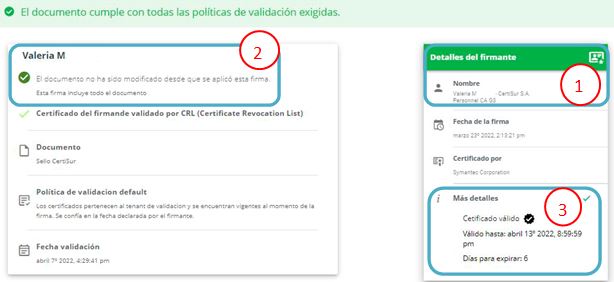
 4. This image shows the result we get when the signature of a document was made with a revoked certificate.
This service can be customized to meet your organization's validation needs by defining your logo, name, or the certificate policies you consider appropriate.
Now that you know how easy it is to validate a signature, make sure to do it every time you receive a signed contract or digital document.
Test
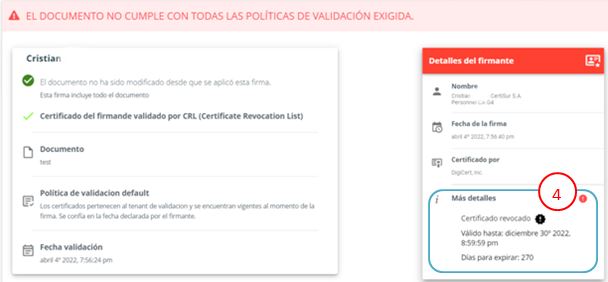
4. This image shows the result we get when the signature of a document was made with a revoked certificate.
This service can be customized to meet your organization's validation needs by defining your logo, name, or the certificate policies you consider appropriate.
Now that you know how easy it is to validate a signature, make sure to do it every time you receive a signed contract or digital document.
Test